Customer Health Intelligence
Churn risk shows up across usage, support, and renewal signals long before someone asks to cancel. StarLifter connects those signals and recommends interventions while there is still time to act.
Demo video
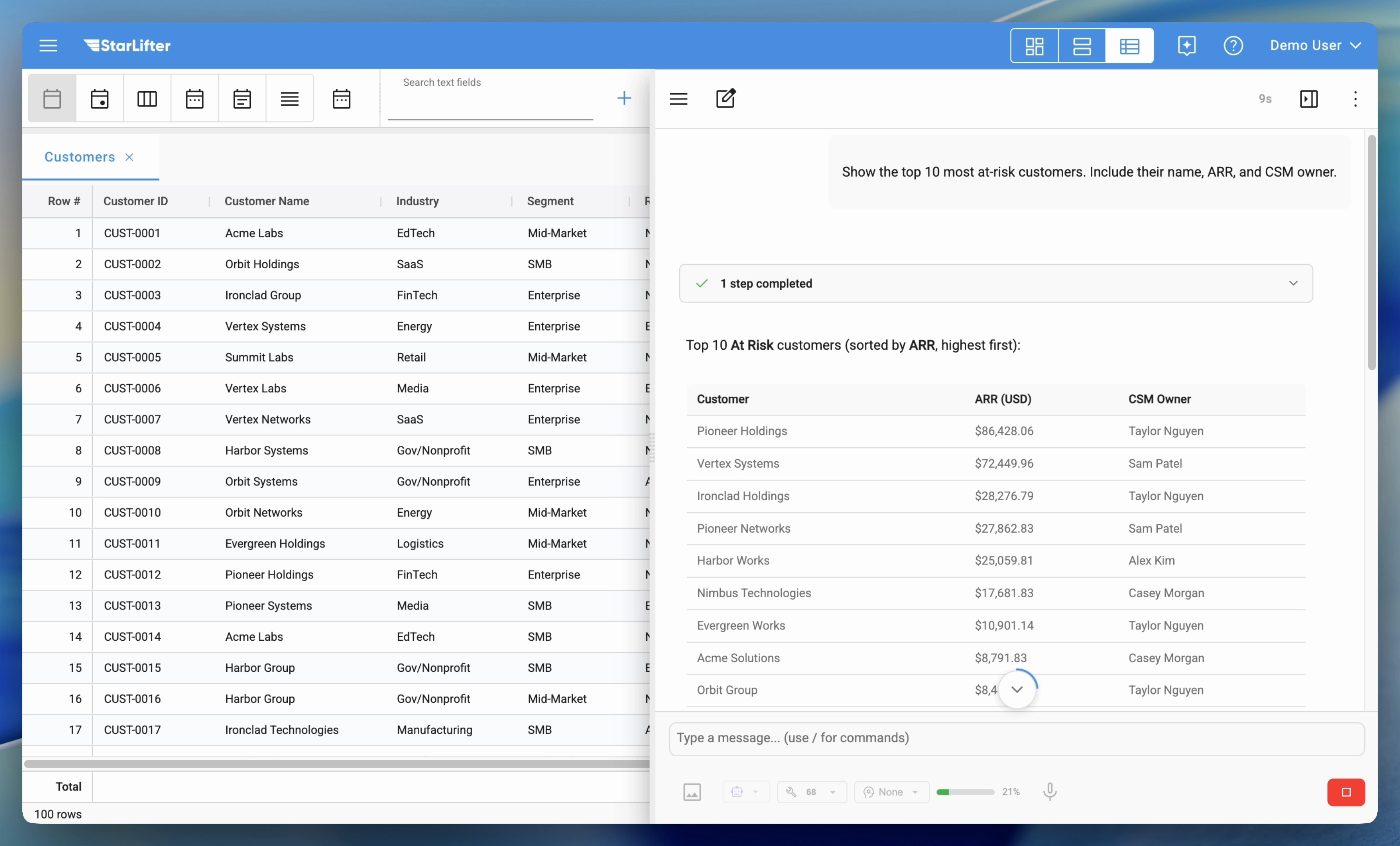
Customer Health from at-risk customer list to action plan
From an at-risk account view through recommended next steps to CRM-ready follow-through—recorded for our demo library on the videos page.
Operating gaps
When health signals never sit in one system
Usage, tickets, billing, surveys, and executive touchpoints often describe the same account with different grain and latency. Teams want a governed way to weight those signals—not another red/yellow/green chart that nobody agrees how to interpret.
When risk shows up quietly before the renewal call
Declining depth of use, support sentiment shifts, or invoice behavior can precede the escalation everyone remembers. The gap is usually early detection with enough context to decide whether to intervene—or to document why you did not.
When “what should we do Tuesday?” needs more than a gut call
CSMs balance dozens of accounts; leadership wants consistency in when to escalate, offer training, or pull in an executive sponsor. Useful patterns pair recommended next steps with the evidence trail—not a black-box score with no rationale.
When account history is fragmented across tabs
Tickets, product milestones, QBR notes, and billing events each tell part of the story. Teams often need a single timeline aligned to the account record so handoffs do not restart from zero.
Example Workflow
One possible weekly rhythm—your territories, health model, and tools will differ. The aim is a shared surface for evidence, decisions, and follow-through.
Start with the At-Risk View
See all accounts sorted by health score, with the most at-risk bubbling to the top.
Drill into Account Details
Click an account to see the timeline — what's driving the low score? Product usage drop? Support escalations?
Review recommended actions
Compare suggested next steps (for example, executive check-in vs. training offer) against the evidence trail and your team’s policies.
Take Action and Log It
Create a task in Salesforce, send an email, or add a note — all synced back to the account record.
Patterns teams model here
Weights, segments, and write-backs follow how your organization already defines risk and ownership.
- • Blend usage, support, billing, and survey signals with explicit rules for what “at risk” means
- • Surface trajectory shifts with enough context to decide whether to intervene
- • Log agreed actions back to the CRM account with approvals your team controls
- • Give CSMs and leadership the same account timeline instead of parallel spreadsheets
- • Adjust weights, alerts, and thresholds when segments or policies change—without a net-new dashboard project
Data Sources & Integrations
Health scores and journey signals are often modeled in warehouses and lakes, joined to CRM accounts, and supplemented by spreadsheets or files. StarLifter connects to the same governed analytical layer and operational systems we support across the platform—so customer teams work from one decision surface.
Snowflake, Databricks, Google BigQuery, and Amazon Redshift—where usage rollups, ticket summaries, billing facts, and survey scores are often curated.
Azure MS SQL and other SQL systems where operational or analytical tables already live.
Salesforce, HubSpot, and ServiceNow for account context and governed write-backs where your teams work today.
CSV and uploaded tables for manual health inputs, exceptions, or sources that still live outside the warehouse.
For the full list of supported connections and how they map to your stack, see our Integrations page. If a source you need is not listed yet, ask us—we are adding connectors over time.
2-Week Deployment
Illustrative starting cadence. Week-one scope follows the account grain and sources you already curate.
Connect & model
- • Connect product, support, and billing data sources
- • Configure health score weights and thresholds
- • Set up alert rules and notification channels
Validate & launch
- • Review health scores against known outcomes
- • Train CSM team on views and processes
- • Go live with ongoing tuning support
Catch churn before it burns
Bring a sample account journey—we will map how health, evidence, and actions could sit on one governed surface.
Discuss a business problem